
Restaurant performance.Clear on your phone.
Napoliy Boss App organizes sales, checks, average check, collections, and operational report details for owners and managers who need to review performance away from the POS.
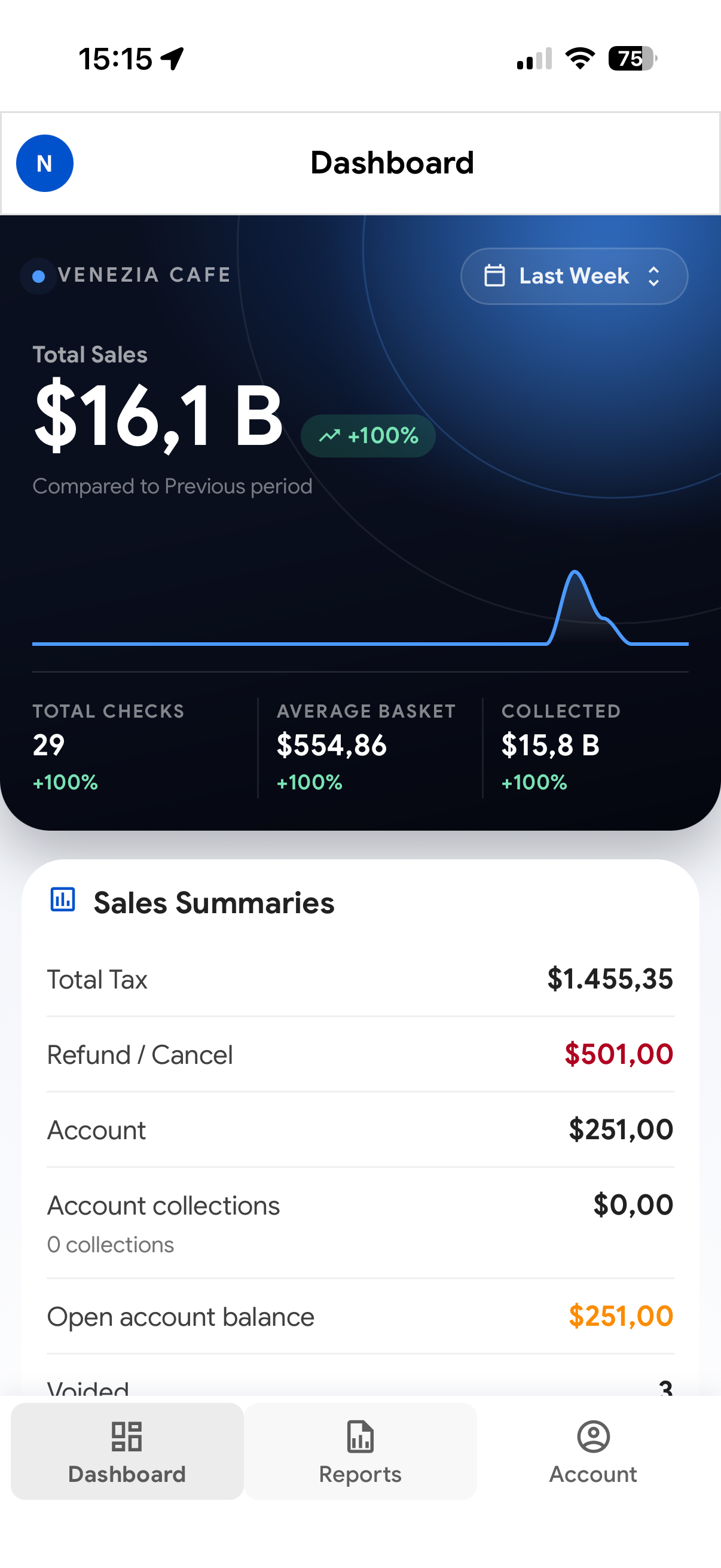
Start with the current operating picture.
The opening view keeps the selected period, sales totals, check activity, and comparison context together so a manager can identify what deserves a closer look.
One clear overview
Review total sales, check count, average basket, collected value, taxes, refunds, and account activity in one mobile dashboard.
Compare the right periods
Switch the reporting window and read performance against the previous period without rebuilding a spreadsheet or hunting through separate screens.
Read operational signals
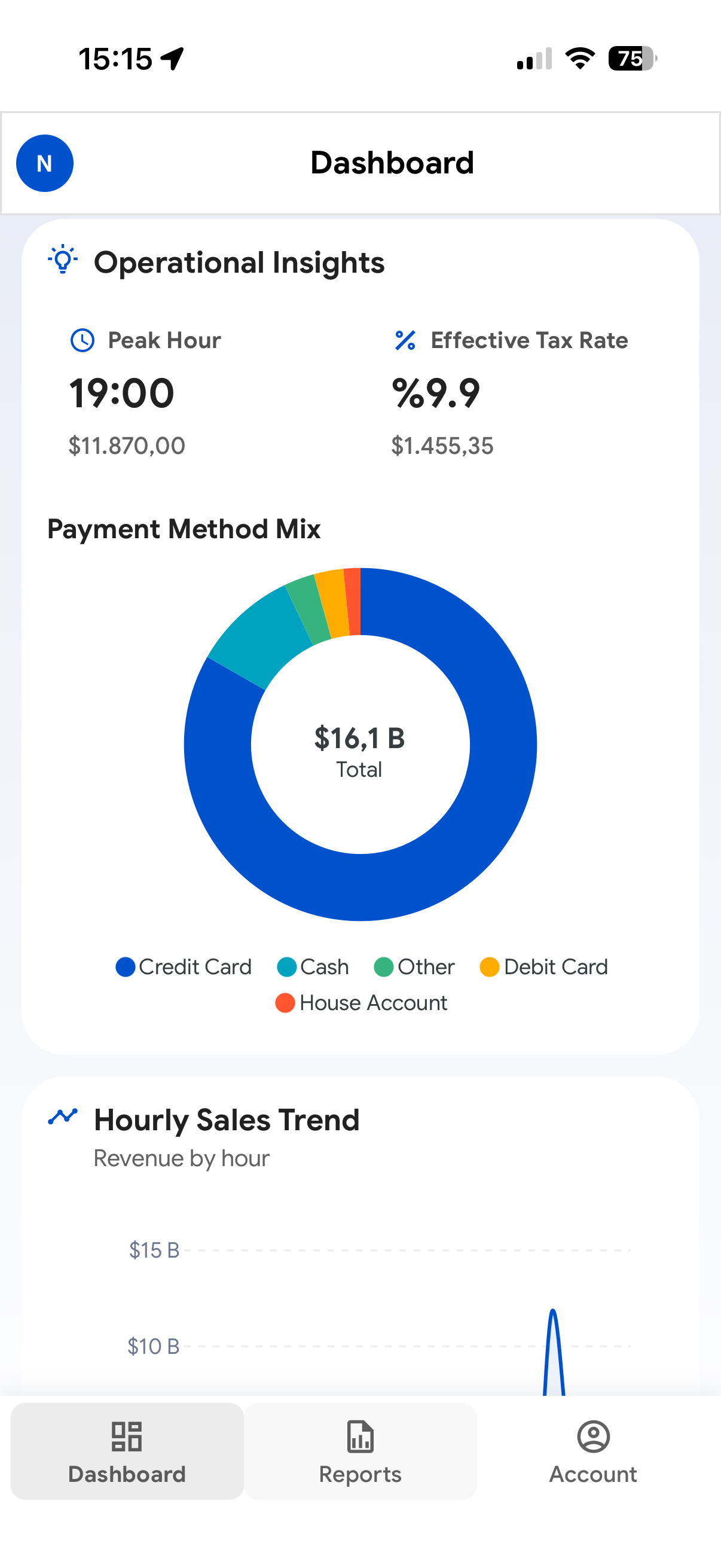
Bring peak hours, payment behavior, sales movement, and exceptional activity into the same management context.
Understand how the sales total was formed.
Payment distribution, hourly movement, and operational adjustments provide the context needed to interpret a period instead of reading one isolated total.
Connect product and category activity with sales.
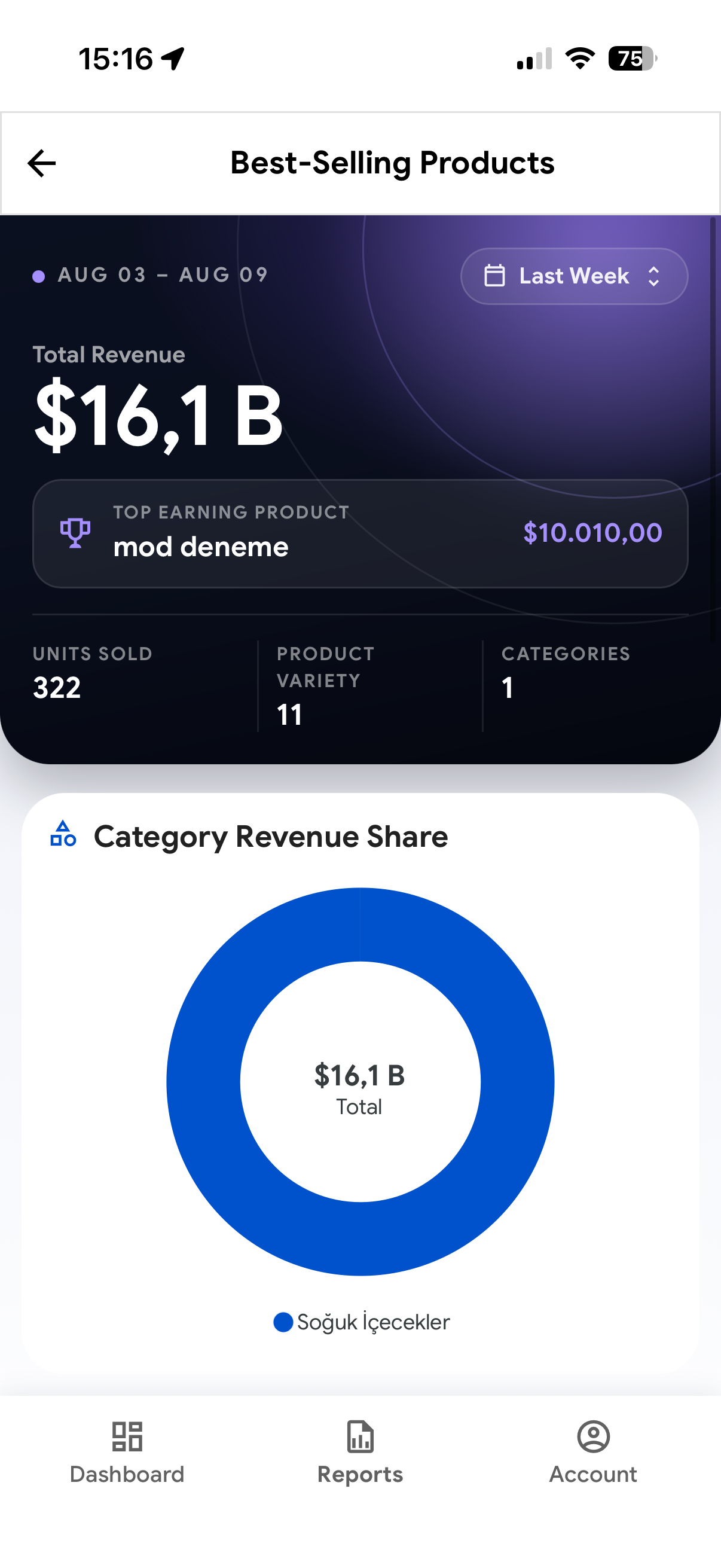
Product and category reports show which items contributed to the selected period, adding quantity and menu-mix context to revenue figures.
Identify the items leading revenue and see which products shape the selected period.
Understand how menu categories contribute to the total instead of treating every sale the same.
Add volume and assortment context to revenue for a more useful performance conversation.
Turn reporting into a repeatable management habit.
Review the period, open the relevant breakdown, and use the same report context when discussing staffing, service, payment, or menu performance with the team.
Scan the day
Start with the current reporting period and the essential numbers that describe performance.
Open the detail
Move into payment, hourly, category, or product views when a number needs an explanation.
Take context forward
Use a shared, readable picture of performance in the conversations and decisions that follow.
Reporting uses the same operational context as Napoliy POS.
Boss App is the management reporting view of the wider Napoliy operation. Explore the products that handle order entry, kitchen preparation, and guest self-service.
Napoliy POS
Bring orders, payments, menu control, and the daily sales context together at the point of sale.
Explore solution Kitchen operationsNapoliy KDS
Give the kitchen a live, organized workspace for preparation, routing, and handoff.
Explore solution Guest orderingNapoliy Kiosk
Let guests build and complete clear orders through a focused self-service experience.
Explore solutionUsing mobile reports in restaurant management.
Practical answers about available metrics, reporting periods, location access, and the difference between operational reporting and accounting.
What is Napoliy Boss App?
Napoliy Boss App is a mobile reporting experience for restaurant owners and managers. It organizes sales and operational metrics into clear dashboards that can be reviewed away from the point-of-sale screen.
Which restaurant metrics can managers review?
The reporting views can cover total sales, check count, average basket, collected value, taxes, refunds and cancellations, payment mix, hourly trends, and product or category performance.
Can I compare different reporting periods?
Yes. The interface is designed around selectable reporting periods and comparison context, helping managers understand how the current result relates to an earlier period.
Can Boss App support a multi-location operation?
Boss App is designed to keep location context visible for growing operations. The exact locations and data a user can review follow the business configuration and access scope.
Does Boss App replace accounting software?
No. Boss App is an operational reporting view for understanding restaurant performance. Formal accounting, tax filing, and financial advice remain separate responsibilities and systems.
Plan a POS demo for your restaurant or store.
See how restaurant POS, retail POS, KDS, payments, inventory, reporting, and multi-location management work together in your business.